Pages

Showing posts with label example. Show all posts

Wednesday, 12 September 2012

Set a Dashboard Landing Page for all Users

If you want all your default and new users to go to a specific page when they login, and they have not set a specific page or their 'home' page is set to default then they can be directed via the PORTALPATH setting.

PORTALPATH

The PORTALPATH setting will only work if the user has not set a new default home page in their account settings.

You will need to make a few changes in the repository to enable this setting.

Open the repository and go to manage --> variables

Navigate the tree displayed and open up Session and then Variables and then System
You will create a new Session Variable here

Right click on the right hand side and select the new PORTALPATH or create a new variable PORTALPATH if no option is presented.

In the Default Initialiser - give the path to the required dashboard. eg /shared/samplesales/_portal/landingpage

Close the repository and those users without a default page in their account setting will instead land on the new landing page.

Thursday, 14 June 2012

bicontentserver(11.1.1) down - an update and fix

Following on from a previous post here.

It turns out that all you have to do is create a new environment variable


BI_ORACLE_HOME and give the value of your middleware install ..\Oracle_BI1 directory.

You then need to restart the service and ..... yay.

Wednesday, 13 June 2012

Waterfall Chart in OBIEE11.1.1.6.0

Waterfall Chart in OBIEE


As several blogs have mentioned there is an unactivated graph in OBIEE 11.1.1.6.0. This is the waterfall chart.

A waterfall chart is a special type of floating-column chart. A typical waterfall chart shows how an initial value is increased and decreased by a series of intermediate values, leading to a final value. An invisible column keeps the increases and decreases linked to the heights of the previous columns.

It used to be possible to mimic this type of behaviour using a stacked bar graph and setting the 'running total' to the same colour as your background, but this is so much easier.

By default this is not visible in the graph list and we need to enable it manually.

Update: Please note this is not supported by Oracle in this version so if you uncover a bug, you're on your own.

Configuration Changes

Edit your instanceconfig.xml file between the <Views>....</Views> element.

Just before the closing tag add the following (leave off the </Views> which I have left in for clarity).

<Charts>
<EnableWaterfall>true</EnableWaterfall>
</Charts>
</Views>

Save the instanceconfig.xml file and restart OPMN.

WaterFall Graph Results

Now when you add a graph view to your query an option for Waterfall appears in the dropdown.


From playing around it is apparent that the four coloured squares (green, green, red and blue) to the right of the graph relate to
1. First (top) coloured square is the start value or initial column.
2. The second coloured square is used to represent increasing or positive values.
3. The third coloured square is used to represent decreasing or negative values.
4. The bottom coloured square is used to show the final balance.

It is possible to change the colours and representation, but, like I said, I'll need to play a bit more.

Saturday, 19 May 2012

OBIEE 11G - Changing Your Password

The Challenge 

There is always more than one way to do something. Setting up the functionality to change your password in OBIEE 11G is no different.

Our experience proved that it is not technically challenging, all the documentation is there, you merely have to spend an hour or so gathering all the facts, doing a little research, and then the fun starts.

Our Solution

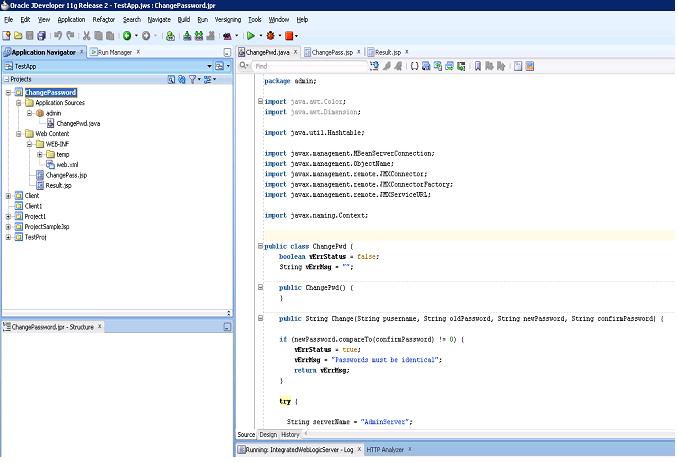
We decided to deploy a JSP and class as a WAR. Mainly because that is something we could achieve and where our experience lay.

We are currently running OBIEE 11.1.1.6 so a careful hunt through the compatibility matrix reveals that Jdeveloper 11.1.2.1 is a good match.

Coding the Java Class

In essense we are going to make a connection to the security mbean and invoke a changeUserPassword


invoke(securityMBeanName,"changeUserPassword",objuser, objstr);

So fire up JDeveloper and lets start


Calling the JSP

We will create a narrative report and use the Session Variable  USER as a parameter in our URL call to the JSP.

The JSP

So we have coded and tested our class now we need a JSP that will use the class. From the narrative report we know the user name and now we can concentrate on the password change functionality. 
We use 3 fields Old Password, New Password and Repeat New Password. By using a web page we have the ability to obscure the characters being entered.

Deploying the WAR 

Wrap everything JSP and Class in a WAR - fortunately this is nearly a one click operation in JDeveloper.

Place the WAR file in a directory on the OBIEE server and deploy using the console. 

You can then call your password change using the narrative report.

Wednesday, 9 May 2012

OBIEE 11G and tnsnames.ora

Where do I put tnsnames.ora in OBIEE 11G?

In versions of OBIEE prior to 11g you would use the tnsnames of the Oracle client and the tnsnames would be found in the network/admin directory.

In OBIEE 11G you can place your tnsnames file directly into the middleware_home/Oracle_BI1/network/admin directory.

Works for me.

Update:

You can connect WITHOUT a tnsnames file.

OBIEE 12c uses a different directory

Saturday, 7 April 2012

OBIEE - Database (Evaluate) Function

Database Functions (EVALUATE)

Users and administrators can create requests by directly calling database functions from either Oracle BI Answers, or by using a logical column (in the logical table source) within the metadata repository. Key uses for these functions include the ability to pass through expressions to get advanced calculations, as well as the ability to access custom written functions or procedures on the underlying database.

Support for database functions does not currently extend across all multidimensional sources. Also, you cannot use these functions with XML data sources.

By default, support for the EVALUATE family of database functions is disabled. You must change the EVALUATE_SUPPORT_LEVEL parameter in NQSConfig.INI to enable support for the EVALUATE* functions. See Oracle Fusion Middleware System Administrator's Guide for Oracle Business Intelligence Enterprise Edition for more information.

Functions include:

    EVALUATE
    EVALUATE_ANALYTIC
    EVALUATE_AGGR
    EVALUATE_PREDICATE


EVALUATE


This function passes the specified database function with optional referenced columns as parameters to the back-end data source for evaluation. This function is intended for scalar calculations, and is useful when you want to use a specialized database function that is not supported by the Oracle BI Server, but that is understood by the underlying data source.

The embedded database function may require one or more columns. These columns are referenced by %1 ... %N within the function. The actual columns must be listed after the function.

The ability to use EVALUATE is disabled by default. To enable support for this function, change the EVALUATE_SUPPORT_LEVEL parameter in NQSConfig.INI. See Oracle Fusion Middleware System Administrator's Guide for Oracle Business Intelligence Enterprise Edition for more information.

Syntax
EVALUATE('db_function(%1...%N)' [AS data_type] [, column1, columnN])Where:
db_function is any valid database function understood by the underlying data source.

data_type is an optional parameter that specifies the data type of the return result. Use this parameter whenever the return data type cannot be reliably predicted from the input arguments. However, do not use this parameter for type casting; if the function needs to return a particular data type, add an explicit cast. You can typically omit this parameter when the database-specific function has a return type not supported by the Oracle BI Server, but is used to generate an intermediate result that does not need to be returned to the Oracle BI Server.

column1 through columnN is an optional, comma-delimited list of columns.

Examples

This example shows an embedded database function.

SELECT EVALUATE('instr(%1, %2)', address, 'Foster City') FROM employees

Examples Using EVALUATE_AGGREGATE and EVALUATE to Leverage Unique Essbase Functions

The following examples use the EVALUATE_AGGREGATE and EVALUATE functions. Note that expressions are applied to columns in the logical table source that refers to the physical cube.Use EVALUATE_AGGREGATE to implement custom aggregations. For example, you may want to compare overall regional profit to profits for the top three products in the region. You can define a new measure to represent the profits for top three products resulting in the Logical SQL statement:

SELECT Region, Profit, EVALUATE_AGGREGATE('SUM(TopCount(%1.members, 3, %2), %3)',Products, Profit, Profit) Top_3_prod_Profit FROM SampleBasic
The Oracle BI Server generates the following expression for the custom aggregation:

member [Measures].[MS1] AS 'SUM(Topcount([Product].Generations(6).members,3,[Measures].[Profit]),[Measures].[Profit])'
Use the EVALUATE function on projected dimensions to implement scalar functions that are computed post-aggregation. EVALUATE may change the grain of the query, if its definition makes explicit references to dimensions (or attributes) that are not in the query.

For example, if you would like to see the Profits for the top five products ranked by Sales sold in a Region, after creating the applicable measure, the resulting Logical SQL statement is as follows

SELECT Region, EVALUATE('TopCount(%1.members, 5, %2)' as VARCHAR(20), Products, Sales), Profits FROM SampleBasic

The Oracle BI Server generates the following expression to retrieve the top five products:

set [Evaluate0] as '{Topcount([Product].Generations(6).members,5,[Measures].[Sales]) }'

EVALUATE_ANALYTIC


This function passes the specified database analytic function with optional referenced columns as parameters to the back-end data source for evaluation.

The embedded database function may require one or more columns. These columns are referenced by %1 ... %N within the function. The actual columns must be listed after the function.

The ability to use EVALUATE_ANALYTIC is disabled by default. To enable support for this function, change the EVALUATE_SUPPORT_LEVEL parameter in NQSConfig.INI. See Oracle Fusion Middleware System Administrator's Guide for Oracle Business Intelligence Enterprise Edition for more information.

Syntax
EVALUATE_ANALYTIC('db_function(%1...%N)' [AS data_type] [, column1, columnN])
Where:

db_function is any valid database analytic function understood by the underlying data source.

data_type is an optional parameter that specifies the data type of the return result. Use this parameter whenever the return data type cannot be reliably predicted from the input arguments. However, do not use this parameter for type casting; if the function needs to return a particular data type, add an explicit cast. You can typically omit this parameter when the database-specific analytic function has a return type not supported by the Oracle BI Server, but is used to generate an intermediate result that does not need to be returned to the Oracle BI Server.

column1 through columnN is an optional, comma-delimited list of columns.

Examples

This example shows an embedded database analytic function.

EVALUATE_ANALYTIC('dense_rank() over(order by %1 )' AS INT,sales.revenue)

If the preceding example needs to return a double, then an explicit cast should be added, as follows:

CAST(EVALUATE_ANALYTIC('Rank(%1.dimension.currentmember, %2.members)',"Foodmart93"."Time"."Month" as Double)

EVALUATE_AGGR


This function passes the specified database function with optional referenced columns as parameters to the back-end data source for evaluation. This function is intended for aggregate functions with a GROUP BY clause.

The embedded database function may require one or more columns. These columns are referenced by %1 ... %N within the function. The actual columns must be listed after the function.

The ability to use EVALUATE_AGGR is disabled by default. To enable support for this function, change the EVALUATE_SUPPORT_LEVEL parameter in NQSConfig.INI. See Oracle Fusion Middleware System Administrator's Guide for Oracle Business Intelligence Enterprise Edition for more information.

Syntax
EVALUATE_AGGR('db_agg_function(%1...%N)' [AS data_type] [, column1, columnN)
Where:

db_agg_function is any valid aggregate database function understood by the underlying data source.

data_type is an optional parameter that specifies the data type of the return result. Use this parameter whenever the return data type cannot be reliably predicted from the input arguments. However, do not use this parameter for type casting; if the function needs to return a particular data type, add an explicit cast. You can typically omit this parameter when the database-specific function has a return type not supported by the Oracle BI Server, but is used to generate an intermediate result that does not need to be returned to the Oracle BI Server.

column1 through columnN is an optional, comma-delimited list of columns.

Example


EVALUATE_AGGR('REGR_SLOPE(%1, %2)', sales.quantity, market.marketkey)

EVALUATE_PREDICATE


This function passes the specified database function with optional referenced columns as parameters to the back-end data source for evaluation. This function is intended for functions with a return type of Boolean.

The embedded database function may require one or more columns. These columns are referenced by %1 ... %N within the function. The actual columns must be listed after the function.

Note that EVALUATE_PREDICATE is not supported for use with Essbase data sources.

The ability to use EVALUATE_PREDICATE is disabled by default. To enable support for this function, change the EVALUATE_SUPPORT_LEVEL parameter in NQSConfig.INI. See Oracle Fusion Middleware System Administrator's Guide for Oracle Business Intelligence Enterprise Edition for more information.

Syntax
EVALUATE_PREDICATE('db_function(%1...%N)', [, column1, columnN)
Where:

db_function is any valid database function with a return type of Boolean that is understood by the underlying data source.

column1 through columnN is an optional, comma-delimited list of columns.

If you want to model a database function for comparison purposes, you should not use EVALUATE_PREDICATE. Instead, use EVALUATE and put the comparison outside the function. For example, do not use EVALUATE_PREDICATE as follows:

EVALUATE_PREDICATE('dense_rank() over (order by 1% ) < 5', sales.revenue)

Instead, use EVALUATE, as follows:

EVALUATE('dense_rank() over (order by 1% ) ', sales.revenue) < 5

Example

SELECT year, Sales AS DOUBLE,CAST(EVALUATE('OLAP_EXPRESSION(%1,''LAG(units_cube_sales, 1, time, time LEVELREL time_levelrel)'')', OLAP_CALC) AS DOUBLE)  FROM "Global".Time, "Global"."Facts - sales" WHERE EVALUATE_PREDICATE('OLAP_CONDITION (%1, ''LIMIT time KEEP ''''1'''', ''''2'''', ''''3'''', ''''4'''' '')=1', OLAP_CALC)  ORDER BY year;

View the original article here.

Friday, 30 March 2012

bicontentserver(11.1.1) down

Has anyone come across the following


The bicontentserver is down. This is from a simple install with all componebts under AdminServer on 7001. If we do an Enterprise install , there are no problems.

I have followed this problem and there are hints that it could be something to do with missing environment variables when creating services, I remain to be convinced.

See here for how I fixed this.

Friday, 2 December 2011

Upgrade 11.1.1.3 to 11.1.1.5

Only undertake the OBIEE upgrade if you have fully backed up database and OBIEE install. This is an in-place upgrade that is not for the faint hearted and I would recommend setting a good 2-3 hours aside to finish.

Pre-requisites.

The details in this article only really apply if you are:
1. Running 32 bit Windows Server 2003 and OBIEE 11.1.1.3 with Weblogic 10.3.3
2. You have installed OBIEE 11.1.1.3 in D:\OBIEE11G

You have read the upgrade / patch details on the Oracle Website

You have downloaded the Weblogic patch from Oracle

You have downloaded the OBIEE 11.1.1.5 disks from Oracle and unpacked them correctly.

Step 1.


Shut down all beasvc processes, OPMN and the Oracle Weblogic NodeManager. No processes or threads should be running as services for the next steps.

Step 2.

Upgrade Weblogic using the patch (wls1035_upgrade_win32.exe).

Select "Next" and accept all defaults.

Step 3.

Some settings have not set correctly in D:\OBIEE11G\user_projects\domains\bifoundation_domain\bin\setDomainEnv.cmd.

Edit the file and ensure that the correct (new) paths are set for all the JAVA HOMES.


set BEA_JAVA_HOME=D:\OBIEE11G\jrockit_160_24_D1.1.2-4

set SUN_JAVA_HOME=D:\OBIEE11G\jdk160_24

if "%JAVA_VENDOR%"=="Oracle" (
 set JAVA_HOME=%BEA_JAVA_HOME%
) else (
 if "%JAVA_VENDOR%"=="Sun" (
  set JAVA_HOME=%SUN_JAVA_HOME%
 ) else (
  set JAVA_VENDOR=Oracle
  set JAVA_HOME=D:\OBIEE11G\jrockit_160_24_D1.1.2-4
 )
)


Step 4.

Now will perform a software only install of 11.1.1.5. Start the installer and select software only install, the existing middleware home and defaults for all the other options.

Step 5.

Now we upgrade the MDS and BIPLATFORM schemas. Ensure these are backed up before starting.
From the command line we will now upgrade the database schemas


cd D:\OBIEE11G\Oracle_BI1\bin

psa.bat -dbConnectString localhost:1521:dbname -dbaUserName sys -schemaUserName YOUR_BIPLATFORM

You will be prompted for the password for SYS and YOUR_BIPLATFORM. Here is the output.

D:\OBIEE11G\Oracle_BI1\bin>psa.bat -dbConnectString strashtdbs043v:1521:tkitt01
-dbaUserName sys -schemaUserName TEST_BIPLATFORM
Oracle Fusion Middleware Patch Set Assistant 11.1.1.5.0

Enter the database administrator password for "sys":
Enter the schema password for schema user "YOUR_BIPLATFORM":
Log file is located at: D:\OBIEE11G\Oracle_BI1\upgrade\logs\psa2011-11-15-13-55-
22PM.log
Updating the Oracle Fusion Middleware Metadata Schema to release 11.1.1.5.0.
Updating schema for component Oracle BI PLATFORM.
The command completed successfully


The we upgrade the MDS schema in a similar fashion.

psa.bat -dbConnectString localhost:1521:dbname-dbaUserName sys -schemaUserName YOUR_MDS


Once again you will be prompted for the SYS and MDS password.

D:\OBIEE11G\Oracle_BI1\bin>psa.bat -dbConnectString strashtdbs043v:1521:tkitt01
-dbaUserName sys -schemaUserName TEST_MDS
Oracle Fusion Middleware Patch Set Assistant 11.1.1.5.0

Enter the database administrator password for "sys":
Enter the schema password for schema user "TEST_MDS":
Log file is located at: D:\OBIEE11G\Oracle_BI1\upgrade\logs\psa2011-11-15-13-57-
17PM.log
Updating the Oracle Fusion Middleware Metadata Schema to release 11.1.1.5.0.
Updating schema for component Oracle Metadata Services.
The command completed successfully


Step 6.

Now we will upgrade the system components. Open a seperate command window and

cd d:\OBIEE11G\user_projects\domains\bifoundation_domain\bin
startWebLogic.cmd


Once Weblogic has started the following commands can be run:

cd d:\OBIEE11G\Oracle_BI1\opmn\bin
set ORACLE_HOME=d:\OBIEE11G\Oracle_BI1
upgradenonj2eeapp.bat -oracleInstance d:\OBIEE11G\instances\instance1 -adminHost localhost -adminPort 7001 -adminUsername weblogic


Replace the "localhost" with your machine name, and you should have an output similar to the following. You will be prompted for the weblogic adminuser password a couple of times as the instance is re-registered.

D:\OBIEE11G\Oracle_BI1\opmn\bin>upgradenonj2eeapp.bat -oracleInstance d:\OBIEE11G\instances\instance1 -adminHost xxxxxxxxxx -adminPort 7001 -adminUsername weblogic
Unregister instance...

Command requires login to weblogic admin server (xxxxxxxxxx):
  Username: weblogic
  Password:

Unregistering instance
Command succeeded.
redeploy NonJ2EEManagement.ear...

Command requires login to weblogic admin server (
xxxxxxxxxx):
  Username: weblogic
  Password:

Redeploying NonJ2EEManagement Application...weblogic.Deployer invoked with options:  -adminurl
xxxxxxxxxx:7001 -username weblogic -name NonJ2EEManagement -source D:\OBIEE11G\Oracle_BI1\opmn\applications\NonJ2EEManagement.ear -redeploy -upload -noexit
<15-Nov-2011 14:12:31 o'clock GMT> <Info> <J2EE Deployment SPI> <BEA-260121> <Initiating redeploy operation for application, NonJ2EEManagement [archive: D:\OBIEE11G\Oracle_BI1\opmn\applications\NonJ2EEManagement.ear], to configured targets.>
Task 0 initiated: [Deployer:149026]deploy application NonJ2EEManagement [Version=11.1.1] on AdminServer.
Task 0 completed: [Deployer:149026]deploy application NonJ2EEManagement [Version=11.1.1] on AdminServer.
Target state: redeploy completed on Server AdminServer

Done
Command succeeded.
re-register instance...

Command requires login to weblogic admin server (
xxxxxxxxxx):
  Username: weblogic
  Password:

Registering instance
Command succeeded.
Successfully upgraded NonJ2EEManagement.ear and the registeration.
D:\OBIEE11G\Oracle_BI1\opmn\bin>

Step 7.

Upgrade Fusion Middleware Shared Libraries, and Security Elements. First we need to shutdown Weblogic

cd d:\OBIEE11G\user_projects\domains\bifoundation_domain\bin

stopWebLogic.cmd


This will close down the Weblogic command window you started previously.

Now we do some Weblogic Scripting to upgrade the

cd d:\OBIEE11G\oracle_common\common\bin

wlst

upgradeJRF('d:/OBIEE11G/user_projects/domains/bifoundation_domain')

upgradeOpss(jpsConfig="d:/OBIEE11G/user_projects/domains/bifoundation_domain/config/fmwconfig/jps-config.xml", jaznData="d:/OBIEE11G/oracle_common/modules/oracle.jps_11.1.1/domain_config/system-jazn-data.xml")

exit()
----- output ------------
D:\OBIEE11G\oracle_common\common\bin>wlst

CLASSPATH=D:\OBIEE11G\patch_wls1035\profiles\default\sys_manifest_classpath\weblogic_patch.jar;D:\OBIEE11G\patch_oepe1050\profiles\default\sys_manifest_classpath\weblogic_patch.jar;D:\OBIEE11G\patch_ocp360\profiles\default\sys_manifest_classpath\weblogic_patch.jar;D:\OBIEE11G\JROCKI~1.2-4\lib\tools.jar;D:\OBIEE11G\WLSERV~1.3\server\lib\weblogic_sp.jar;D:\OBIEE11G\WLSERV~1.3\server\lib\weblogic.jar;D:\OBIEE11G\modules\features\weblogic.server.modules_10.3.5.0.jar;D:\OBIEE11G\WLSERV~1.3\server\lib\webservices.jar;D:\OBIEE11G\modules\ORGAPA~1.1/lib/ant-all.jar;D:\OBIEE11G\modules\NETSFA~1.0_1/lib/ant-contrib.jar;;D:\OBIEE11G\ORACLE~1/modules/oracle.jrf_11.1.1/jrf-wlstman.jar;D:\OBIEE11G\ORACLE~1\common\wlst\lib\ADF-SH~1.JAR;D:\OBIEE11G\ORACLE~1\common\wlst\lib\ADFSCR~1.JAR;D:\OBIEE11G\ORACLE~1\common\wlst\lib\mdswlst.jar;D:\OBIEE11G\ORACLE~1\common\wlst\RESOUR~1\AUDITW~1.JAR;D:\OBIEE11G\ORACLE~1\common\wlst\RESOUR~1\IGFWLS~1.JAR;D:\OBIEE11G\ORACLE~1\common\wlst\RESOUR~1\jps-wlst.jar;D:\OBIEE11G\ORACLE~1\common\wlst\RESOUR~1\jrf-wlst.jar;D:\OBIEE11G\ORACLE~1\common\wlst\RESOUR~1\OAMAP_~1.JAR;D:\OBIEE11G\ORACLE~1\common\wlst\RESOUR~1\OAMAUT~1.JAR;D:\OBIEE11G\ORACLE~1\common\wlst\RESOUR~1\ossoiap.jar;D:\OBIEE11G\ORACLE~1\common\wlst\RESOUR~1\OSSOIA~1.JAR;D:\OBIEE11G
\ORACLE~1\common\wlst\RESOUR~1\OVDWLS~1.JAR;D:\OBIEE11G\ORACLE~1\common\wlst\RESOUR~1\SSLCON~1.JAR;D:\OBIEE11G\ORACLE~1\common\wlst\RESOUR~1\wsm-wlst.jar

PATH=D:\OBIEE11G\patch_wls1035\profiles\default\native;D:\OBIEE11G\patch_oepe1050\profiles\default\native;D:\OBIEE11G\patch_ocp360\profiles\default\native;D:\OBIEE11G\WLSERV~1.3\server\native\win\32;D:\OBIEE11G\WLSERV~1.3\server\bin;D:\OBIEE11G\modules\ORGAPA~1.1\bin;D:\OBIEE11G\JROCKI~1.2-4\jre\bin;D:\OBIEE11G\JROCKI~1.2-4\bin;C:\WINDOWS\system32;C:\WINDOWS;C:\WINDOWS\System32\Wbem;D:\OBIEE11G\Oracle_BI1\bin;D:\OBIEE11G\Oracle_BI1\opmn\bin;D:\OBIEE11G\Oracle_BI1\opmn\lib;D:\OBIEE11G\Oracle_BI1\perl\bin;D:\OBIEE11G\Oracle_BI1\products\Essbase\EssbaseServer\bin;D:\OBIEE11G\WLSERV~1.3\server\native\win\32\oci920_8

Your environment has been set.

CLASSPATH=D:\OBIEE11G\patch_wls1035\profiles\default\sys_manifest_classpath\weblogic_patch.jar;D:\OBIEE11G\patch_oepe1050\profiles\default\sys_manifest_classpath\weblogic_patch.jar;D:\OBIEE11G\patch_ocp360\profiles\default\sys_manifest_classpath\weblogic_patch.jar;D:\OBIEE11G\JROCKI~1.2-4\lib\tools.jar;D:\OBIEE11G\WLSERV~1.3\server\lib\weblogic_sp.jar;D:\OBIEE11G\WLSERV~1.3\server\lib\weblogic.jar;D:\OBIEE11G\modules\features\weblogic.server.modules_10.3.5.0.jar;D:\OBIEE11G\WLSERV~1.3\server\lib\webservices.jar;D:\OBIEE11G\modules\ORGAPA~1.1/lib/ant-all.jar;D:\OBIEE11G\modules\NETSFA~1.0_1/lib/ant-contrib.jar;;D:\OBIEE11G\ORACLE~1/modules/oracle.jrf_11.1.1/jrf-wlstman.jar;D:\OBIEE11G\ORACLE~1\common\wlst\lib\ADF-SH~1.JAR;D:\OBIEE11G\ORACLE~1\common\wlst\lib\ADFSCR~1.JAR;D:\OBIEE11G\ORACLE~1\common\wlst\lib\mdswlst.jar;D:\OBIEE11G\ORACLE~1\common\wlst\RESOUR~1\AUDITW~1.JAR;D:\OBIEE11G\ORACLE~1\common\wlst\RESOUR~1\IGFWLS~1.JAR;D:\OBIEE11G\ORACLE~1\common\wlst\RESOUR~1\jps-wlst.jar;D:\OBIEE11G\ORACLE~1\common\wlst\RESOUR~1\jrf-wlst.jar;D:\OBIEE11G\ORACLE~1\common\wlst\RESOUR~1\OAMAP_~1.JAR;D:\OBIEE11G\ORACLE~1\common\wlst\RESOUR~1\OAMAUT~1.JAR;D:\OBIEE11G\ORACLE~1\common\wlst\RESOUR~1\ossoiap.jar;D:\OBIEE11G\ORACLE~1\common\wlst\RESOUR~1\OSSOIA~1.JAR;D:\OBIEE11G\ORACLE~1\common\wlst\RESOUR~1\OVDWLS~1.JAR;D:\OBIEE11G\ORACLE~1\common\wlst\RESOUR~1\SSLCON~1.JAR;D:\OBIEE11G\ORACLE~1\common\wlst\RESOUR~1\wsm-wlst.jar;D:\OBIEE11G\utils\config\10.3\config-launch.jar;D:\OBIEE11G\WLSERV~1.3\common\derby\lib\derbynet.jar;D:\OBIEE11G\WLSERV~1.3\common\derby\lib\derbyclient.jar;D:\OBIEE1
1G\WLSERV~1.3\common\derby\lib\derbytools.jar;;

Initializing WebLogic Scripting Tool (WLST) ...

Welcome to WebLogic Server Administration Scripting Shell

Type help() for help on available commands

wls:/offline>
wls:/offline> upgradeJRF('d:/OBIEE11G/user_projects/domains/bifoundation_domain'
)
upgradeJRF: BEGIN
Apply patch template
Create Library "adf.oracle.businesseditor#1.0@11.1.1.2.0"
Target Library "adf.oracle.businesseditor#1.0@11.1.1.2.0" to JRF "bi_cluster"
Target Library "adf.oracle.businesseditor#1.0@11.1.1.2.0" to JRF "AdminServer"
Create Library "oracle.adf.desktopintegration.model#1.0@11.1.1.2.0"
Target Library "oracle.adf.desktopintegration.model#1.0@11.1.1.2.0" to JRF "bi_cluster"
Target Library "oracle.adf.desktopintegration.model#1.0@11.1.1.2.0" to JRF "AdminServer"
Create Library "oracle.adf.desktopintegration#1.0@11.1.1.2.0"
Target Library "oracle.adf.desktopintegration#1.0@11.1.1.2.0" to JRF "bi_cluster"
Target Library "oracle.adf.desktopintegration#1.0@11.1.1.2.0" to JRF "AdminServer"
Target Library instances from sub-templates:
Target Library "oracle.bi.adf.model.slib#1.0@11.1.1.2.0" to JRF "bi_cluster"
Target Library "oracle.bi.adf.model.slib#1.0@11.1.1.2.0" to JRF "AdminServer"
Target Library "oracle.bi.adf.view.slib#1.0@11.1.1.2.0" to JRF "bi_cluster"
Target Library "oracle.bi.adf.view.slib#1.0@11.1.1.2.0" to JRF "AdminServer"
Target Library "oracle.bi.adf.webcenter.slib#1.0@11.1.1.2.0" to JRF "bi_cluster"
Target Library "oracle.bi.adf.webcenter.slib#1.0@11.1.1.2.0" to JRF "AdminServer"
Target Library "oracle.bi.jbips#11.1.1@0.1" to JRF "bi_cluster"
Target Library "oracle.bi.jbips#11.1.1@0.1" to JRF "AdminServer"
Target Library "oracle.bi.composer#11.1.1@0.1" to JRF "bi_cluster"
Target Library "oracle.bi.composer#11.1.1@0.1" to JRF "AdminServer"
Create StartupClass "Web Services Startup Class"
Target StartupClass "Web Services Startup Class" to JRF "bi_cluster"
Target StartupClass "Web Services Startup Class" to JRF "AdminServer"
Set DiagnosticContextEnabled for server "bi_server1"
Set DiagnosticContextEnabled for server "AdminServer"
Copy JRF configuration files from D:\OBIEE11G\ORACLE~1/modules to d:/OBIEE11G/user_projects/domains/bifoundation_domain/config/fmwconfig/servers/bi_server1
Copy JRF configuration files from D:\OBIEE11G\ORACLE~1/modules to d:/OBIEE11G/user_projects/domains/bifoundation_domain/config/fmwconfig/servers/AdminServer
upgradeJRF: FINISH
wls:/offline>
wls:/offline>upgradeOpss(jpsConfig="d:/OBIEE11G/user_projects/domains/bifoundation_domain/config/fmwconfig/jps-config.xml", jaznData="d:/OBIEE11G/oracle_common/modules/oracle.jps_11.1.1/domain_config/system-jazn-data.xml")
Starting upgrade of jps configuration and security stores.
WLS ManagedService is not up running. Fall back to use system properties for configuration.
15-Nov-2011 14:23:49 oracle.security.jps.internal.tools.utility.destination.apibased.JpsDstPolicy <init>
WARNING: No identity store associate with policy store found.
Upgrade of jps configuration and security stores is done.
wls:/offline>
wls:/offline>exit()


Exiting WebLogic Scripting Tool.

D:\OBIEE11G\oracle_common\common\bin>


and now we upgrade the OBIEE home.

wlst d:\OBIEE11G\Oracle_BI1\bin\bi-upgrade.py --bioraclehome d:\OBIEE11G\Oracle_BI1 --domainhome d:\OBIEE11G\user_projects\domains\bifoundation_domain


and finally the  policy repository, and for this we need to start up weblogic from a new command window.

cd d:\OBIEE11G\user_projects\domains\bifoundation_domain\bin\
startWebLogic.cmd


once the server is running... replace localhost with your machine name and password with your weblogic adminuser password

cd d:\OBIEE11G\oracle_common\common\bin
wlst
connect ('weblogic','password','t3://localhost:7001')
upgradeWSMPolicyRepository()
exit()


this will give you something like the following output

D:\OBIEE11G\oracle_common\common\bin>wlst

CLASSPATH=D:\OBIEE11G\patch_wls1035\profiles\default\sys_manifest_classpath\weblogic_patch.jar;D:\OBIEE11G\patch_oepe1050\profiles\default\sys_manifest_classpath\weblogic_patch.jar;D:\OBIEE11G\patch_ocp360\profiles\default\sys_manifest_classpath\weblogic_patch.jar;D:\OBIEE11G\JROCKI~1.2-4\lib\tools.jar;D:\OBIEE11G\WLSERV~1.3\server\lib\weblogic_sp.jar;D:\OBIEE11G\WLSERV~1.3\server\lib\weblogic.jar;D:\OBIEE11G\modules\features\weblogic.server.modules_10.3.5.0.jar;D:\OBIEE11G\WLSERV~1.3\server\lib\webservices.jar;D:\OBIEE11G\modules\ORGAPA~1.1/lib/ant-all.jar;D:\OBIEE11G\modules\NETSFA~1.0_1/lib/ant-contrib.jar;;D:\OBIEE11G\ORACLE~1/modules/oracle.jrf_11.1.1/jrf-wlstman.jar;D:\OBIEE11G\ORACLE~1\common\wlst\lib\ADF-SH~1.JAR;D:\OBIEE11G\ORACLE~1\common\wlst\lib\ADFSCR~1.JAR;D:\OBIEE11G\ORACLE~1\common\wlst\lib\mdswlst.jar;D:\OBIEE11G\ORACLE~1\common\wlst\RESOUR~1\AUDITW~1.JAR;D:\OBIEE11G\ORACLE~1\common\wlst\RESOUR~1\IGFWLS~1.JAR;D:\OBIEE11G\ORACLE~1\common\wlst\RESOUR~1\jps-wlst.jar;D:\OBIEE11G\ORACLE~1\common\wlst\RESOUR~1\jrf-wlst.jar;D:\OBIEE11G\ORACLE~1\common\wlst\RESOUR~1\OAMAP_~1.JAR;D:\OBIEE11G\ORACLE~1\common\wlst\RESOUR~1\OAMAUT~1.JAR;D:\OBIEE11G\ORACLE~1\common\wlst\RESOUR~1\ossoiap.jar;D:\OBIEE11G\ORACLE~1\common\wlst\RESOUR~1\OSSOIA~1.JAR;D:\OBIEE11G\ORACLE~1\common\wlst\RESOUR~1\OVDWLS~1.JAR;D:\OBIEE11G\ORACLE~1\common\wlst\RESOUR~1\SSLCON~1.JAR;D:\OBIEE11G\ORACLE~1\common\wlst\RESOUR~1\wsm-wlst.jar

PATH=D:\OBIEE11G\patch_wls1035\profiles\default\native;D:\OBIEE11G\patch_oepe1050\profiles\default\native;D:\OBIEE11G\patch_ocp360\profiles\default\native;D:\OBIEE11G\WLSERV~1.3\server\native\win\32;D:\OBIEE11G\WLSERV~1.3\server\bin;D:\OBIEE11G\modules\ORGAPA~1.1\bin;D:\OBIEE11G\JROCKI~1.2-4\jre\bin;D:\OBIEE11G\JROCKI~1.2-4\bin;C:\WINDOWS\system32;C:\WINDOWS;C:\WINDOWS\System32\Wbem;D:\OBIEE11G\Oracle_BI1\bin;D:\OBIEE11G\Oracle_BI1\opmn\bin;D:\OBIEE11G\Oracle_BI1\opmn\lib;D:\OBIEE11G\Oracle_BI1\perl\bin;D:\OBIEE11G\Oracle_BI1\products\Essbase\EssbaseServer\bin;D:\OBIEE11G\WLSERV~1.3\server\native\win\32\oci920_8

Your environment has been set.

CLASSPATH=D:\OBIEE11G\patch_wls1035\profiles\default\sys_manifest_classpath\weblogic_patch.jar;D:\OBIEE11G\patch_oepe1050\profiles\default\sys_manifest_classpath\weblogic_patch.jar;D:\OBIEE11G\patch_ocp360\profiles\default\sys_manifest_classpath\weblogic_patch.jar;D:\OBIEE11G\JROCKI~1.2-4\lib\tools.jar;D:\OBIEE11G\WLSERV~1.3\server\lib\weblogic_sp.jar;D:\OBIEE11G\WLSERV~1.3\server\lib\weblogic.jar;D:\OBIEE11G\modules\features\weblogic.server.modules_10.3.5.0.jar;D:\OBIEE11G\WLSERV~1.3\server\lib\webservices.jar;D:\OBIEE11G\modules\ORGAPA~1.1/lib/ant-all.jar;D:\OBIEE11G\modules\NETSFA~1.0_1/lib/ant-contrib.jar;;D:\OBIEE11G\ORACLE~1/modules/oracle.jrf_11.1.1/jrf-wlstman.jar;D:\OBIEE11G\ORACLE~1\common\wlst\lib\ADF-SH~1.JAR;D:\OBIEE11G\ORACLE~1\common\wlst\lib\ADFSCR~1.JAR;D:\OBIEE11G\ORACLE~1\common\wlst\lib\mdswlst.jar;D:\OBIEE11G\ORACLE~1\common\wlst\RESOUR~1\AUDITW~1.JAR;D:\OBIEE11G\ORACLE~1\common\wlst\RESOUR~1\IGFWLS~1.JAR;D:\OBIEE11G\ORACLE~1\common\wlst\RESOUR~1\jps-wlst.jar;D:\OBIEE11G\ORACLE~1\common\wlst\RESOUR~1\jrf-wlst.jar;D:\OBIEE11G\ORACLE~1\common\wlst\RESOUR~1\OAMAP_~1.JAR;D:\OBIEE11G\ORACLE~1\common\wlst\RESOUR~1\OAMAUT~1.JAR;D:\OBIEE11G\ORACLE~1\common\wlst\RESOUR~1\ossoiap.jar;D:\OBIEE11G\ORACLE~1\common\wlst\RESOUR~1\OSSOIA~1.JAR;D:\OBIEE11G\ORACLE~1\common\wlst\RESOUR~1\OVDWLS~1.JAR;D:\OBIEE11G\ORACLE~1\common\wlst\RESOUR~1\SSLCON~1.JAR;D:\OBIEE11G\ORACLE~1\common\wlst\RESOUR~1\wsm-wlst.jar;D:\OBIEE11G\utils\config\10.3\config-launch.jar;D:\OBIEE11G\WLSERV~1.3\common\derby\lib\derbynet.jar;D:\OBIEE11G\WLSERV~1.3\common\derby\lib\derbyclient.jar;D:\OBIEE11G\WLSERV~1.3\common\derby\lib\derbytools.jar;;

Initializing WebLogic Scripting Tool (WLST) ...

Welcome to WebLogic Server Administration Scripting Shell

Type help() for help on available commands

wls:/offline>

wls:/offline> connect ('weblogic','xxxxxxxx','t3://xxxxxxxxx:7001')
Connecting to t3://xxxxxxxxxx:7001 with userid weblogic ...
Successfully connected to Admin Server 'AdminServer' that belongs to domain 'bif
oundation_domain'.

Warning: An insecure protocol was used to connect to the
server. To ensure on-the-wire security, the SSL port or
Admin port should be used instead.

wls:/bifoundation_domain/serverConfig> upgradeWSMPolicyRepository()
Location changed to domainRuntime tree. This is a read-only tree with DomainMBea
n as the root.
For more help, use help(domainRuntime)


Starting Operation upgradeWSMPolicyRepository ...


The following documents have been added to the repository.

oracle/no_addressing_policy
oracle/no_authentication_client_policy
oracle/no_authentication_service_policy
oracle/no_authorization_component_policy
oracle/no_authorization_service_policy
oracle/no_messageprotection_client_policy
oracle/no_messageprotection_service_policy
oracle/no_mtom_policy
oracle/no_wsrm_policy
oracle/sts_trust_config_client_policy
oracle/sts_trust_config_client_template
oracle/sts_trust_config_service_policy
oracle/sts_trust_config_service_template
oracle/whitelist_authorization_policy
oracle/wss10_saml20_token_client_policy
oracle/wss10_saml20_token_client_template
oracle/wss10_saml20_token_service_policy
oracle/wss10_saml20_token_service_template
oracle/wss10_saml20_token_with_message_protection_client_policy
oracle/wss10_saml20_token_with_message_protection_client_template
oracle/wss10_saml20_token_with_message_protection_service_policy
oracle/wss10_saml20_token_with_message_protection_service_template
oracle/wss11_kerberos_token_with_message_protection_basic128_client_policy
oracle/wss11_kerberos_token_with_message_protection_basic128_service_policy
oracle/wss11_saml20_token_with_message_protection_client_policy
oracle/wss11_saml20_token_with_message_protection_client_template
oracle/wss11_saml20_token_with_message_protection_service_policy
oracle/wss11_saml20_token_with_message_protection_service_template
oracle/wss11_sts_issued_saml_hok_with_message_protection_client_policy
oracle/wss11_sts_issued_saml_hok_with_message_protection_client_template
oracle/wss11_sts_issued_saml_hok_with_message_protection_service_policy
oracle/wss11_sts_issued_saml_hok_with_message_protection_service_template
oracle/wss11_sts_issued_saml_with_message_protection_client_policy
oracle/wss11_sts_issued_saml_with_message_protection_client_template
oracle/wss_saml20_token_bearer_over_ssl_client_policy
oracle/wss_saml20_token_bearer_over_ssl_client_template
oracle/wss_saml20_token_bearer_over_ssl_service_policy
oracle/wss_saml20_token_bearer_over_ssl_service_template
oracle/wss_saml20_token_over_ssl_client_policy
oracle/wss_saml20_token_over_ssl_client_template
oracle/wss_saml20_token_over_ssl_service_policy
oracle/wss_saml20_token_over_ssl_service_template
oracle/wss_saml_or_username_token_service_policy
oracle/wss_sts_issued_saml_bearer_token_over_ssl_client_policy
oracle/wss_sts_issued_saml_bearer_token_over_ssl_client_template
oracle/wss_sts_issued_saml_bearer_token_over_ssl_service_policy
oracle/wss_sts_issued_saml_bearer_token_over_ssl_service_template

The following documents have changed since the last installed version of the product.
 Please import the latest version of the files using Oracle Enterprise Manager.

oracle/binding_authorization_denyall_policy
oracle/binding_authorization_permitall_policy
oracle/binding_permission_authorization_policy
oracle/component_authorization_denyall_policy
oracle/component_authorization_permitall_policy
oracle/component_permission_authorization_policy
oracle/log_policy
oracle/wsaddr_policy
oracle/wsmtom_policy
oracle/wsrm10_policy
oracle/wsrm11_policy
oracle/wss10_message_protection_client_policy
oracle/wss10_message_protection_service_policy
oracle/wss10_saml_hok_token_with_message_protection_client_policy
oracle/wss10_saml_hok_token_with_message_protection_client_template
oracle/wss10_saml_hok_token_with_message_protection_service_policy
oracle/wss10_saml_hok_token_with_message_protection_service_template
oracle/wss10_saml_token_client_policy
oracle/wss10_saml_token_client_template
oracle/wss10_saml_token_service_policy
oracle/wss10_saml_token_service_template
oracle/wss10_saml_token_with_message_integrity_client_policy
oracle/wss10_saml_token_with_message_integrity_service_policy
oracle/wss10_saml_token_with_message_protection_client_policy
oracle/wss10_saml_token_with_message_protection_client_template
oracle/wss10_saml_token_with_message_protection_service_policy
oracle/wss10_saml_token_with_message_protection_service_template
oracle/wss10_saml_token_with_message_protection_ski_basic256_client_policy
oracle/wss10_saml_token_with_message_protection_ski_basic256_service_policy
oracle/wss10_username_id_propagation_with_msg_protection_client_policy
oracle/wss10_username_id_propagation_with_msg_protection_service_policy
oracle/wss10_username_token_with_message_protection_client_policy
oracle/wss10_username_token_with_message_protection_service_policy
oracle/wss10_username_token_with_message_protection_ski_basic256_client_policy
oracle/wss10_username_token_with_message_protection_ski_basic256_service_policy
oracle/wss10_x509_token_with_message_protection_client_policy
oracle/wss10_x509_token_with_message_protection_service_policy
oracle/wss11_kerberos_token_client_policy
oracle/wss11_kerberos_token_service_policy
oracle/wss11_kerberos_token_with_message_protection_client_policy
oracle/wss11_kerberos_token_with_message_protection_service_policy
oracle/wss11_message_protection_client_policy
oracle/wss11_message_protection_service_policy
oracle/wss11_saml_or_username_token_with_message_protection_service_policy
oracle/wss11_saml_token_identity_switch_with_message_protection_client_policy
oracle/wss11_saml_token_with_message_protection_client_policy
oracle/wss11_saml_token_with_message_protection_client_template
oracle/wss11_saml_token_with_message_protection_service_policy
oracle/wss11_saml_token_with_message_protection_service_template
oracle/wss11_username_token_with_message_protection_client_policy
oracle/wss11_username_token_with_message_protection_service_policy
oracle/wss11_x509_token_with_message_protection_client_policy
oracle/wss11_x509_token_with_message_protection_service_policy
oracle/wss_http_token_client_policy
oracle/wss_http_token_over_ssl_client_policy
oracle/wss_http_token_over_ssl_service_policy
oracle/wss_http_token_service_policy
oracle/wss_saml_or_username_token_over_ssl_service_policy
oracle/wss_saml_token_bearer_over_ssl_client_policy
oracle/wss_saml_token_bearer_over_ssl_client_template
oracle/wss_saml_token_bearer_over_ssl_service_policy
oracle/wss_saml_token_bearer_over_ssl_service_template
oracle/wss_saml_token_over_ssl_client_policy
oracle/wss_saml_token_over_ssl_client_template
oracle/wss_saml_token_over_ssl_service_policy
oracle/wss_saml_token_over_ssl_service_template
oracle/wss_username_token_client_policy
oracle/wss_username_token_over_ssl_client_policy
oracle/wss_username_token_over_ssl_service_policy
oracle/wss_username_token_service_policy

upgradeWSMPolicyRepositoryOperation Completed.

wls:/bifoundation_domain/serverConfig>


Step 8

Upgrade the Oracle BI Presentation Server Catalog
With the presentation server down we will do an upgrade of the catalog. First we have to edit the instanceconfig.xml file to force an upgrade.


<ps:Catalog xmlns:ps="oracle.bi.presentation.services/config/v1.1">
<ps:UpgradeAndExit>false</ps:UpgradeAndExit>
</ps:Catalog>
 
to 
 
<ps:Catalog xmlns:ps="oracle.bi.presentation.services/config/v1.1">
<ps:UpgradeAndExit>true</ps:UpgradeAndExit>
</ps:Catalog> 
 
Start the presentation service and then edit the instanceconfig.xml back to its original 'false' setting.
 
Now reboot to test that all your services come up as expected.
 
Good luck and let me know how you get on.
 

Thursday, 1 December 2011

Adding a Excel spreadsheet as a datasource in OBIEE

OBIEE can combine Excel spreadsheets as sources of data into your BI solution.

Here's a quick run-through of the stepsyou should take to include the spreadsheet.


1. Open the excel file to the sheet in the workbook you want to use as a datasource.

2. Ensure you have no filters set.

3. Highlight the range of rows and columns you wish to use, including the column headings. The column headings will become the column names. Right click and give your range selection a name or you can go to Formulas-->Define Name and give the scope and range.

4. Each spreadsheet can have multiple named ranges. Each named range will become a "table".

5. Now you need to create a System DSN for the Excel data source. Open the Data Sources (ODBC) from the Control Panel or Administrative Tools menu.  Select the Microsoft Excel Driver from the list of drivers.

6. Give the DSN a name and browse to the spreadsheet with the named range and click on Ok.

7. Open the OBIEE Administraton Tool. For OBIEE 10g go to Administration tools and click on File>Import from Database. Select the DSN which you created for Excel. For OBIEE 11g select File>Import Metadata - the DSN should be in the list of DSN data sources available, select the DSN and continue to import as normal through the wizard.

8. When you click on Import, it will import all the tables present in that excel file.

9. Once you get the tables in physical layer, you can play around with those tables to create subject area.

Sunday, 31 July 2011

More on Dates

Do you have timestamp values????

And do you want to......, well join them to a date????

Cast(timestamp_value as DATE)

Does the same as TRUNC(timestamp_value) in Oracle. It removes the time section and you are left with just the date part.

Works in Prompts as well as prompted columns (fortunately).

Wednesday, 23 March 2011

OBIEE 11G and Flex using crossdomain.xml in Weblogic

For Flex viewer to communicate with a remote data source you need to deploy a small XML file in the root directory of the domain containing the data source.

The crossdomain.xml file has the structure


<?xml version="1.0"?>
<!DOCTYPE cross-domain-policy SYSTEM "http://www.adobe.com/xml/dtds/cross-domain-policy.dtd">
<cross-domain-policy>
<site-control policies="all"></site-control>
<allow-access-from domain="*"></allow-access-from>
</cross-domain-policy>


With OBIEE 10G we had a physical directory.

Now with 11G we are presented with weblogic and no root directory, .......bother.

The solution is to deploy an application for the root directory.

All is explained below

in the %BI Home%\Oracle_BI1\bifoundation\jee directory you create a directory called (in this case) apps
in the apps directory you place your crossdomain.xml file and create two further directories.

META-INF and WEB-INF

in the WEB-INF directory you place two files with the contents detailed below

web.xml


<web-app xsi="http://www.w3.org/2001/XMLSchema-instance" xmlns="http://java.sun.com/xml/ns/javaee" web="http://java.sun.com/xml/ns/javaee/web-app_2_5.xsd" schemalocation="http://java.sun.com/xml/ns/javaee http://java.sun.com/xml/ns/javaee/web-app_2_5.xsd" id="WebApp_ID" version="2.5">
<welcome-file-list>
<welcome-file>crossdomain.xml</welcome-file>
</welcome-file-list>
<mime-mapping>
<extension>xml</extension>
<mime-type>application/xml</mime-type>
</mime-mapping>
</web-app>


weblogic.xml


<?xml version='1.0' encoding='UTF-8'?>
<wls:weblogic-web-app xmlns:wls="http://xmlns.oracle.com/weblogic/weblogic-web-app" xmlns:xsi="http://www.w3.org/2001/XMLSchema-instance" xsi:schemaLocation="http://java.sun.com/xml/ns/javaee http://java.sun.com/xml/ns/javaee/web-app_2_5.xsd http://xmlns.oracle.com/weblogic/weblogic-web-app http://xmlns.oracle.com/weblogic/weblogic-web-app/1.1/weblogic-web-app.xsd">
<wls:weblogic-version>10.3.3</wls:weblogic-version>
<wls:context-root>/</wls:context-root>
<wls:container-descriptor>
<wls:default-mime-type>application/xml</wls:default-mime-type>
</wls:container-descriptor>
</wls:weblogic-web-app>

Then you deploy the open directory (apps) as an application on the BI server and accept all defaults.

Tuesday, 15 March 2011

Char to Date

How to convert a CHAR to a Date datatype.

Assuming that the format of the char date is consistent the easiest is to use the EVALUATE function

EVALUATE('TO_DATE(%1,%2)' AS DATE,,'dd/mm/yyyy')

Here's a good article on more with changing a CHAR using the CAST function in OBIEE.

Happy Hacking